
THE FIELD GUIDE
Stella Sora Guide Directory
50 guides for Global players. Each page states the version, client or source limits that affect its answer.
YOUR NEXT TASK / 50 GUIDES
Choose a guide by task.
10 guides
Start & Recruit
Start an account, understand recruitment and spend toward a working squad.
- Beginner Guide: Early Progression
Choose an early progression goal and keep resources focused on a usable squad.
- Reroll Guide
Restart a new account without confusing account switching, beginner pulls and deletion.
- Starter 5-Star Selection Guide
Choose between a missing starter, a usable team partner and a duplicate.
- Trekker Progression Guide
Identify the upgrade that is actually blocking a Trekker and keep early spending focused.
- Farming and Upgrade Materials Guide
Find the right material trial and distinguish ordinary farming from temporary bonus drops.
- Daily Reset and Daily Routine
Plan Global daily and weekly claims in your own timezone.
- Recruitment and Pity Guide
Separate a banner’s one-time recruitment bonus from its guarantee and carryover counters.
- Banner Schedule and Recruitment Choices
Read the announced recruitment windows and distinguish ordinary, exclusive and anniversary pools.
- Codes and Redemption Guide
Check dated code evidence and redeem to the correct Global character.
- Progression Planner and Toolbox Guide
Use the in-game Toolbox Progression Planner for upgrade materials without confusing the plan with your inventory.
10 guides
Trekkers
Find a Trekker and follow a build with its team and version conditions.
- Trekker Tier List
Compare the covered Trekkers by version, role and account-friendly alternatives.
- Characters and Trekker Roster
Look up covered Trekkers by element, rarity and commission style, keeping different forms distinct.
- Chitose: Auto Attack Build Reference
Reproduce the documented Chitose Auto Attack recipe and recognize the later changes that limit its old comparisons.
- Karin: Ultimate Build and Team Choices
Assemble Karin’s documented Ultimate-focused recipe and distinguish it from her Auto Attack branch.
- Allie: Skill Build and Team Choices
Choose and assemble the documented Allie Skill build, including a team without Suntide Willow.
- Fuyuka Build and Teams
Build the documented single-target Fuyuka setup and choose realistic support and Disc alternatives.
- Otoha: Weeping Sky Support Build
Build Otoha’s Weeping Sky support branch for a prepared Umbra team.
- Nazuna Build and Teams
Identify Nazuna correctly and build the documented Main-slot Terra Mark team.
- Flora: Ignis Support Build
Build base Flora as an Ignis Soulflare support and understand which teammate benefits from it.
- Firstlight Noya Build and Teams
Separate Firstlight Noya from the standard Noya and plan around the currently published recruitment facts.
7 guides
Buildcraft
Connect combat roles, Potentials, Records and Runic Discs.
- Build Guide: From Trekkers to Records
Connect permanent upgrades, Potentials and Disc slots into a build that serves a mode.
- Team Building and Element Teams
Assign Main and Support jobs, then replace partners without losing the team’s interaction.
- Combat Guide
Understand movement, Main and Support skills, and the positioning errors that waste a rotation.
- Runic Disc Guide
Understand Main and Support Disc slots, Harmony notes, levels and Crescendo.
- Runic Disc Tier List
Compare five-star Discs by element, slot and supported team use.
- Runic Disc Selector Guide
Identify your Disc selector and choose from its actual pool.
- Records: Saving and Submission Guide
Save a useful Record and avoid consuming it accidentally in a submission.
6 guides
Heartlink & Story
Choose gifts, find a Special Memory and follow the story’s identities.
- Heartlink and Affinity Guide
Start Heartlink invitations and understand their affinity, story and repeat limits.
- Special Memory Choices
Look up the exact second invitation choice by Trekker and location, with random-trigger limits.
- Trekker Gift Preferences
Find a preferred gift for the covered Trekkers and compare mail gifting with crafting.
- Story Chapters and Branching Choices
Find a chapter, understand a consequential branch and check replay restrictions.
- The Tyrant: Identity and Story Role
Identify the protagonist called the Tyrant or Boss without treating theories about the past as confirmed lore.
- Angie: Story Role and Appearances
Identify Angie’s supported story role and separate it from unconfirmed playable-character claims.
10 guides
Monoliths & Events
Check the right activity, zone and announcement window.
- Monolith Guide
Prepare an Ascension run, make coherent choices and understand what the saved Record keeps.
- Anniversary and Version 2.0 Guide
Separate the anniversary’s event, login, recruitment and permanent-content schedules.
- The Tyrant's Tower Guide
Understand the permanent Tyrant’s Tower system and the limits of its published access and reward details.
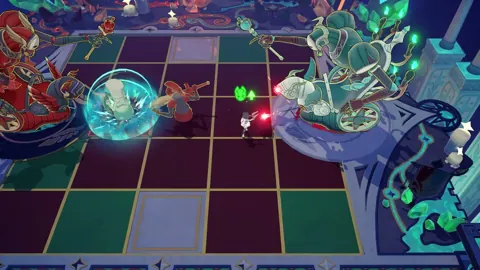
- Through Hostile Depths Guide
Prepare the board and distinguish the released beta from the announced permanent mode.
- Cataclysm Survivor Guide
Choose the announced Cataclysm zone and distinguish clearing from the extra score reward.
- Speed & Wheels Guide
Check the Speed & Wheels period, published objective and reward scope before starting a run.
- Fatebound Stellar Deck Guide
Make matching hands, meet the target and read the correct attempt and reward limits.
- Summit Show Guide
Enter Summit Show, match encounter affixes and distinguish its mission reward conditions.
- Menace Arena and Menace Gala
Find an available Menace Arena and use an eligible Record for its timed stages.
- Bouncing Bumper Bash Guide
Launch, catch and use Trekker skills to meet the arcade stage target.

7 guides
Play & Account
Choose a client, preserve your progress and resolve account problems.
- PC Download and Client Setup
Choose the official Windows launcher or the scheduled Steam client and preserve the correct Global login.
- System Requirements and Download Size
Compare dated launcher and Steam specifications without confusing required free space with download size.
- Release Date: Global Launch and Steam
Distinguish the original Global launch from the later Steam schedule and its time-zone display.
- Cross-Save and Account Linking
Continue an existing Global account on another supported client without starting a second save.
- Steam Missing Progress and Login Help
Find the original Global save when Steam opens a fresh account.
- Account Deletion and Data Requests
Request permanent account deletion through the official channel and distinguish it from signing out.
- Purchase Not Received: Support Guide
Report a charged but undelivered purchase with the correct storefront and evidence.