
The Tyrant’s Tower is a permanent customization system introduced after maintenance on October 19, 2026. The official card says you customize Monoliths and campsites already discovered, collect Treasures, spend time with Trekkers and complete missions. Published reward examples include Brick of Dreams, Automatic Vending Artifact and Furniture Collection Honor Titles, with Stellanite Dust in the notice and Cerulean Ticket on the newer card. The exact menu path, unlock prerequisites, mission totals and repeat rules are not stated, so follow the entry and conditions displayed in the current client.
Official Version 2.0 announcement and official Tower card, checked October 19, 2026. This is a system overview, not a tested layout, mission walkthrough or furniture database. The similarly named Chapter 9 stage is a story location and is kept distinct from the permanent customization system.
Sources checked:
On this page
A permanent system, not a two-week event
The Version 2.0 preview gives “permanent after maintenance on Oct. 19, 2026 (UTC-7)” as the period. Unlike Speed & Wheels or Summit Show, the Tower does not inherit the November 2 closing time from the limited anniversary events.
What the published sources establish
Scroll the table sideways on a narrow screen.
| Topic | Published answer | Still check in the client |
|---|---|---|
| Availability | Permanent after the October 19 maintenance | The actual maintenance completion time on your platform |
| Entry | A system is now available | The menu label or unlock requirement in your client |
| Customization target | Monoliths and campsites already discovered | Whether a particular discovered location is eligible |
| Published activities | Customize, spend time with Trekkers, collect Treasures, complete missions | Current interaction buttons and mission counters |
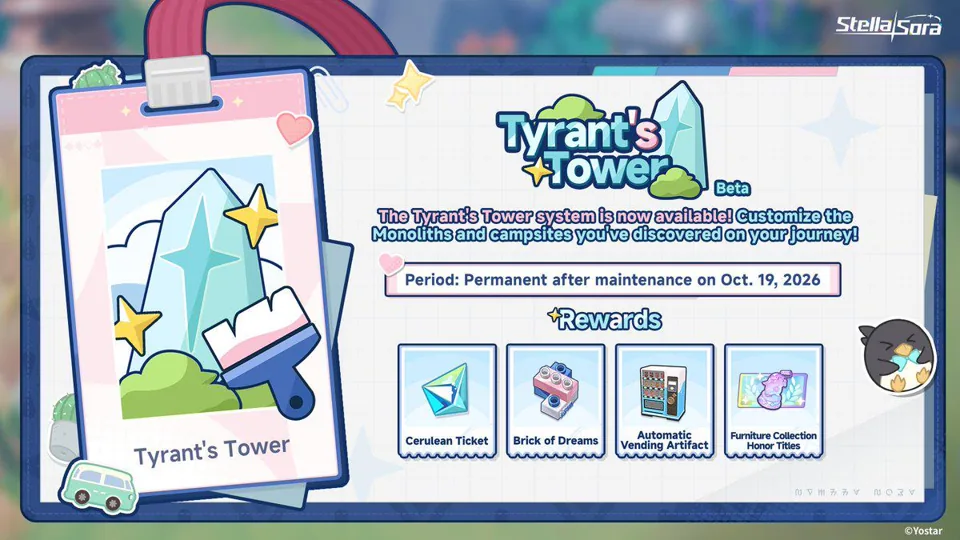
The four confirmed activities
Official card and preview wording translated into player actions
Scroll the table sideways on a narrow screen.
| Activity | What is confirmed | What is not confirmed |
|---|---|---|
| Customize | Arrange the appearance of discovered Monoliths and campsites | Furniture costs, placement limits and which rooms or surfaces are editable |
| Trekker interaction | Spend time with Trekkers in the system | Affinity gains, schedules or unique dialogue outcomes |
| Treasure collection | Collect Treasures as a stated activity | Map locations, spawn rules or a complete collectible list |
| Missions | Complete missions tied to the system | Exact objectives, chapter order or total mission count |
Treat the Tower as a separate long-term system. It is not a new combat entry for Monolith runs, and its furniture actions are not proof that the same objects change combat. The announced activities describe customization, collection and interaction; no stat effect for the Tower interior is stated.
How to start without inventing a menu path
- Finish updating and launching the current Global client. Confirm the server has completed the October 19 maintenance.
- Open the available Tyrant’s Tower system entry. The public preview names the system but does not publish the exact menu breadcrumb.
- Read the first mission or tutorial prompt before spending furniture resources. It should identify the eligible discovered Monolith or campsite.
- Inspect the customization, Trekker, Treasure and mission tabs or prompts that your client actually presents. Do not assume every source-described activity is available in the first minute.
If the entry is absent, compare your client version and current update status. The official notice does not give an Authorization Level threshold, so inventing one would be misleading. Use the client’s support or update screen if the system remains unavailable after the update.
Reward examples and the limits of mission guidance
Examples published across the notice and official card
Scroll the table sideways on a narrow screen.
| Reward | Source | Boundary |
|---|---|---|
| Stellanite Dust | Version 2.0 preview text | A reward example, not every mission’s guaranteed amount |
| Cerulean Ticket | Newer official promotional card | The card and older notice list different examples; check the live reward preview |
| Brick of Dreams | Preview and promotional card | No conversion value or exchange rate is published |
| Automatic Vending Artifact | Preview and promotional card | The sources do not establish a function or interaction effect |
| Furniture Collection Honor Titles | Preview and promotional card | Collection thresholds and title names are not listed |
Mission completion is the evident reward gate: the announcement says to complete missions to earn the listed examples. It does not say that decorating alone, collecting one Treasure or meeting a Trekker guarantees the same reward. Inspect each mission’s current requirement and claimed state.
If a reward appears missing, first separate mission completion from reward claim and decorative collection. The source set is insufficient to diagnose inventory, mailbox or delivery behavior; use the normal support path for an actual account issue.
Do not confuse it with the Chapter 9 location
A community wiki identifies “The Tyrant’s Tower” as Stage 2C of Chapter 9, set inside a desert Monolith. That is a story-stage name. The permanent system uses Monoliths and campsites you have discovered and adds customization, Treasures and missions. Sharing a title does not make the story battle a tutorial for the new home system.
For the story location’s context, see the chapter and branch guide. For current combat routes, use the Monolith guide. Neither page is a Tower furniture catalogue.
Sources & scope
These notes organize the sources below. Creator observations belong to their authors; this site has not performed the gameplay tests. A source check is separate from a game update or publication date.
Browse this guide category · All guides